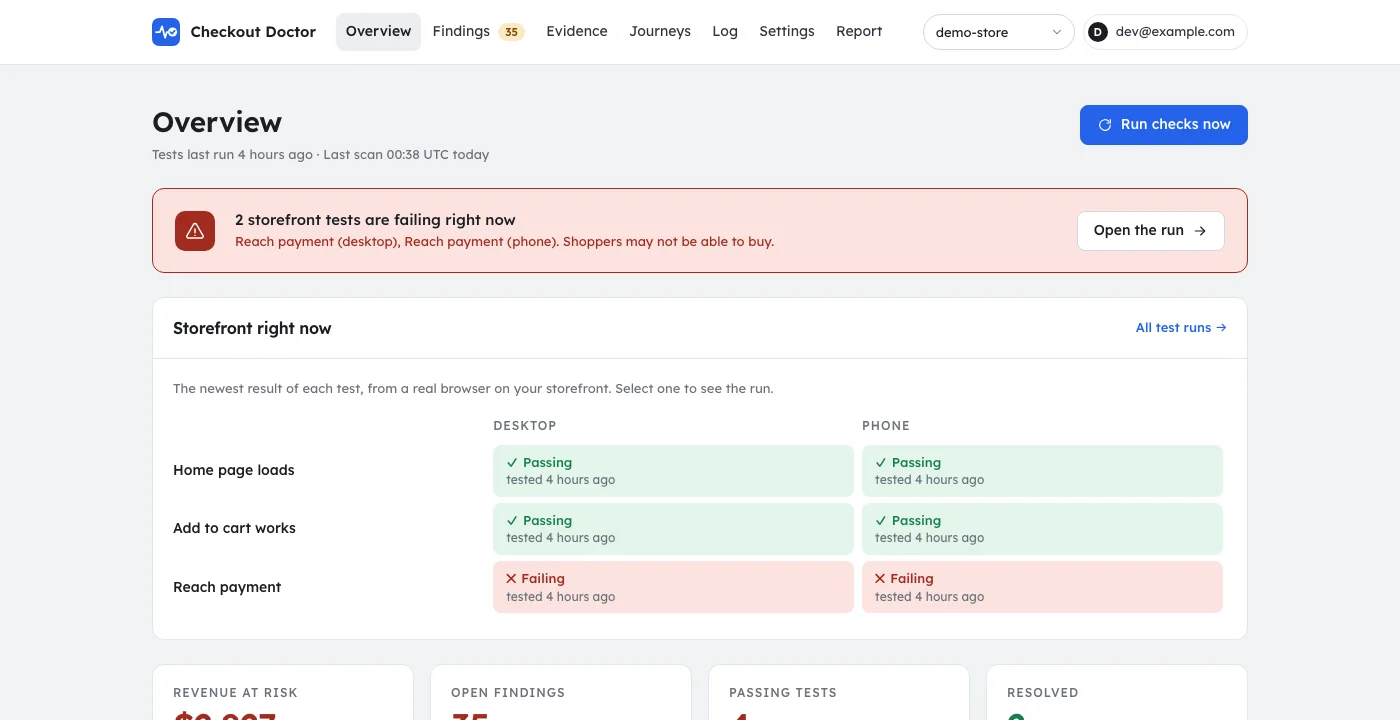
Can a shopper buy?
The health check, on desktop and phone.
- The home page loads and has content
- A product can be added to the cart
- Checkout reaches the payment step
- The storefront is not blocking the test browser (password page, bot protection)
Checkout monitoring for Shopify
Checkout Doctor shops your store on a schedule in a real browser, on desktop and phone, checks every step against your own Shopify data, and reports each failure with an estimated dollar figure and proof. It never enters payment details and never places an order.
A theme update moves the buy button. A discount code expires early, or two codes start stacking. A shipping zone loses its rate and one country can no longer check out. Nothing crashes and nobody gets an alert, so the first sign is usually a quiet week.
Checkout Doctor tests the buying path the way a shopper uses it, every day or every hour depending on the plan, and tells you when something stops working.
Three steps from install to the first result.
The app reads products, discounts, shipping zones, and recent orders from Shopify, read-only. It builds its tests from what your store actually sells and offers.
It opens your storefront on a desktop and a phone, adds a product to the cart, applies discounts, enters a test address, and walks to the payment step. It stops there. Shopify does not let crawlers into checkout, so the storefront tests cover the store and the cart, and checkout pricing is verified separately, without an order.
Each finding says what broke, roughly what it cost, what changed in the store just before, and shows the screenshots. Alerts go to email, Slack, or Shopify Flow.
Concrete checks, each tied to something that costs a store money when it breaks.
The health check, on desktop and phone.
Each test compares the storefront with your own Shopify data.
Collected on every run, no extra setup.
Checked against the last 60 days of orders and your shipping zones.
Journeys learned from your own storefront, on the paid plans.
For stores whose checkout exposes WebMCP.
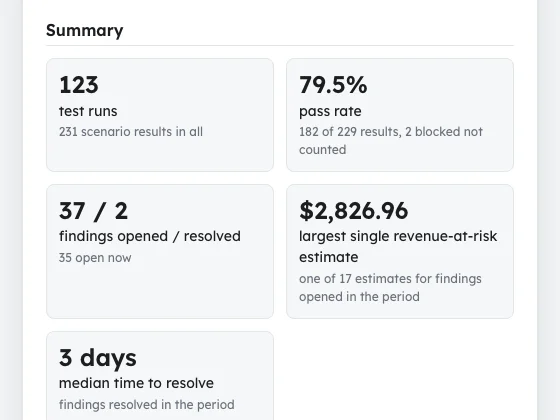
Screens from the app, shown with a demonstration store.
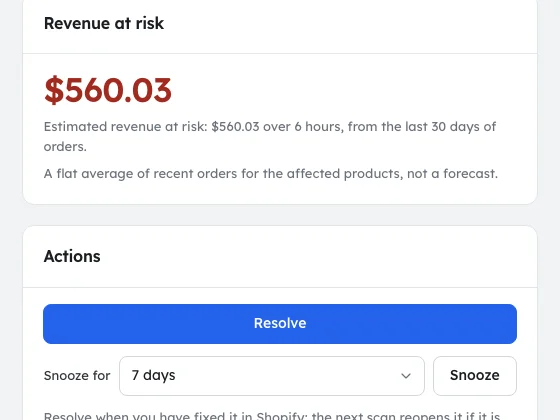
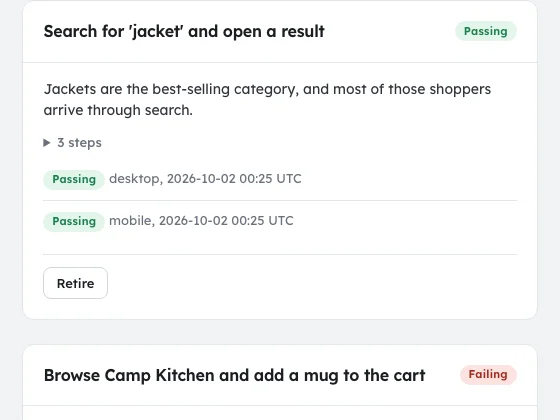
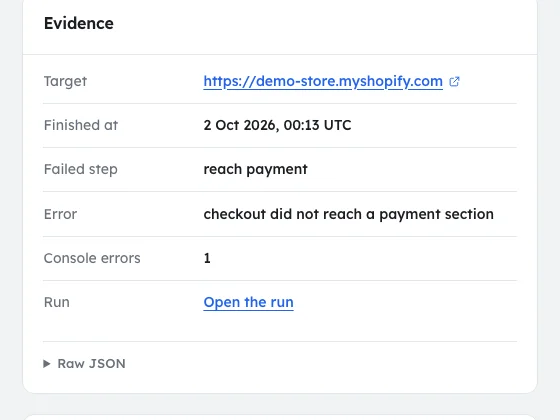
The tests end before the payment step, no card details are ever entered, and the test browser cannot submit a payment or complete a checkout.
The test browser's user agent ends in CheckoutDoctor/1.0 and its first page carries utm_source=checkoutdoctor, so you can filter it out of analytics.
The app reads your public storefront to learn the paths shoppers take through it. Journeys never fill in an email, name, address or message, so they cannot create a signup, a contact or an order, and they stop at checkout.
Admin access is read-only: discounts, inventory, markets, orders, products, shipping, and themes. The app cannot change your products, prices, or orders. It prices test carts through the Storefront API, never an order, and on a password-protected store it creates one Storefront access token for that.
Uninstalling, or a Shopify erasure request, deletes the store's mirrored data, sessions, and findings. Test-run files expire within 30 days.
Start with the free health check. Paid plans test more often and cover more of the store. Billed through Shopify.
$0 /month
$29 /month
$79 /month
$199 /month
The findings are also available to AI assistants over MCP, the open protocol assistants use to call tools. Sign in once in your browser; there is no API key.
Install steps for each assistant
Assistants can read findings and change a finding's status in this app. They cannot change your Shopify store.
It shops your Shopify store on a schedule in a real browser, on desktop and phone, and checks each step against your own Admin data: prices, discounts, stock, shipping zones, and orders. Every failure is reported with an estimated dollar figure and proof such as screenshots and what changed in the store just before.
No. The tests stop before the payment step, no card details are entered, and the test browser cannot submit a payment or complete a checkout. The checkout test does type a fixed test contact (email qa@agntwrk.com, name QA Check, 350 5th Ave, New York, NY 10118) and clicks continue, so Shopify can record some of its checkouts as abandoned checkouts with that email. Filter on that email or name.
On a password-protected store, save the storefront password in the app's settings and the test browser signs in with it. If your store challenges the test browser with a captcha or a firewall, the tests are reported as blocked rather than as failures. Create a crawler access signature in Shopify admin (Online Store, Preferences, Crawler access), paste it into the app's settings, and the test browser sends it to your store's domain only; it lasts at most 3 months and the app warns you before it ends. Shopify does not let any crawler into checkout, so the storefront tests cover the store and the cart, and checkout pricing is verified separately, without an order.
It is a flat average, not a forecast: the recent revenue per hour of the store, or of the affected products, times the hours the problem has been open, up to a cap. It ignores time of day and day of week, and it is left out when the store has too few recent orders to estimate from.
A copy of your catalog, discounts, shipping zones, and 60 days of orders (no customer names or addresses; the customer email is kept only as a one-way hash), the findings it produces, and the screenshots and videos of test runs, which are deleted after 30 days. Uninstalling deletes the store's data. The privacy policy lists every field.
On paid plans the app reads your public storefront (home, a collection, a product, search, the cart, a few menu pages) and proposes the paths shoppers take through your own store, such as a search or a variant picker. Journeys never type an email, name, address, message, or payment detail and stop at checkout, so they cannot create signups, contacts, or orders.
Only to learn journeys, and only a text summary of your public storefront pages: page titles, headings, and the names of links, buttons, and form fields, with your store's web address. No customer, order, or Admin data and no screenshots are sent. The app can use Anthropic, Google, or OpenAI, one at a time and the next only if a call fails; with none available, built-in default journeys are used and nothing is sent.
Yes. The test browser's user agent ends in CheckoutDoctor/1.0 and its first page carries utm_source=checkoutdoctor and utm_medium=monitor. The how-it-works page has the steps for Google Analytics and Shopify analytics.
There is a free health check. Starter is $29 per month, Growth $79, and Pro $199, billed through Shopify. The plans differ in how often the tests run and how much of the store they cover.
Yes. The app runs an MCP server at https://checkoutdoctor.agntwrk.com/mcp. Add it as a connector, sign in in your browser, and ask for your open findings, the proof for one, or to run the checks again. Install steps for each assistant are at https://checkoutdoctor.agntwrk.com/docs/mcp.
Read-only access. Uninstalling removes what the app stored.